 HyperSnap 8.16.17
Screenshots of HyperSnap


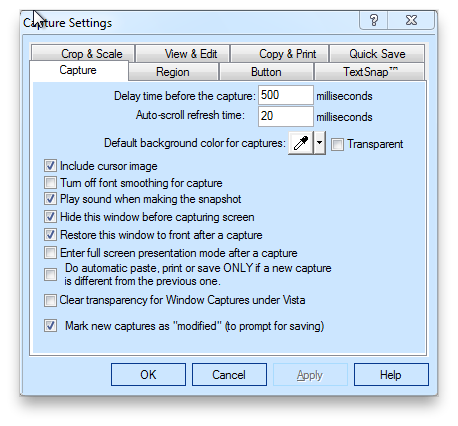

HyperSnap Editor's Review
Capture screens and text with this must have graphics utility.
If you're a techwriter creating help files, a training creating manuals or anyone who needs to capture portions of your screen or text you can't necessarily copy and paste, then you need to take a serious look at HyperSnap. It’s a screen and text capturing utility for Windows.
HyperSnap is the fastest and easiest way to take screen and editable text captures from any part of your Windows screen. HyperSnap combines the power of a first-class screen capture application with an advanced image editing utility. It's perfect for capturing images and normally uncapturable text that you want to include in things like Help systems, online tutorials, manuals, presentations, marketing materials, Web pages, emails, etc. It's easy to use, and does a really great job of capturing screen items you thought might be inaccessible.
Pros: Complete screen and text capturing solution.
Cons: Expensive for a screen capture program.
Conclusion: HyperSnap is one of the best screen capturing utilities available on the market. Its small, fast, light, easily accessible and easy to use. With it, you can capture just about anything visible on your screen, whether it's text, or some graphical screen element.
There are very few programs on the market in this class of utility. For what HyperSnap does, it's one of the best available. The fact that as of this writing it costs $40 USD is unfortunate. While it is good at what it does, $40 USD is quite a bit for a screen capturing utility, no matter how good it is. However, it you have to have a tool like this, HyperSnap is likely one of your best choices.
version reviewed: 6.91
HyperSnap Publisher's Description
HyperSnap is the fastest and easiest way to take screen captures as imagesfrom any part of Windows screen. Combines the power of a first-class screen capture application with an advanced image editing utility - wrapped into one easy-to-use tool!
It's perfect for capturing images that you want to include in your Help system, online tutorials, manuals,...
Other Languages
Look for Similar Items by Category
This product is also listed in: Image Editors, Illustration
Feedback
- If you need help or have a question, contact us
- Would you like to update this product info?
- Is there any feedback you would like to provide? Click here
Popular Downloads
-
 Kundli
4.5
Kundli
4.5
-
 Macromedia Flash 8
8.0
Macromedia Flash 8
8.0
- FastSum 1.9
-
 Cool Edit Pro
2.1.3097.0
Cool Edit Pro
2.1.3097.0
-
 FastSum Standard Edition
1.6
FastSum Standard Edition
1.6
-
 Cheat Engine
6.8.1
Cheat Engine
6.8.1
-
 Hill Climb Racing
1.0
Hill Climb Racing
1.0
-
 My Talking Tom
1.0
My Talking Tom
1.0
-
 C-Free
5.0
C-Free
5.0
-
 Tom VPN
2.2.8
Tom VPN
2.2.8
-
 Vector on PC
1.0
Vector on PC
1.0
-
 Grand Theft Auto: Vice City
1.0
Grand Theft Auto: Vice City
1.0
-
 Netcut
2.1.4
Netcut
2.1.4
-
 GeoGebra
5.0.44
GeoGebra
5.0.44
- HP LaserJet 1100 Printer Drivers 4.3.2.5
-
 Mozilla Firefox
108.0...
Mozilla Firefox
108.0...
-
 Vidnoz AI
1.0.0
Vidnoz AI
1.0.0
-
 QQ Player
3.9.923
QQ Player
3.9.923
-
 FormatFactory
4.3
FormatFactory
4.3
-
 Windows XP Service Pack 3
Build...
Windows XP Service Pack 3
Build...